
SQ777 Game Best Pakistani Earning App Launched 2026 Free Download

Description
SQ777 Game is a modern Android gaming platform designed to provide smooth gameplay, fast performance and an easy-to-use interface. The app offers multiple game modes, secure account management and optimised functionality, making it suitable for both beginners and experienced players. With its clean design and responsive controls, the SQ777 Game App delivers an enjoyable mobile gaming experience on a wide range of Android devices.
The SQ777 game catalogue includes popular titles across slots, fishing, cards and live categories. Browse categories or use search to find a particular title and explore its rules and features.
Visit the Promo section to explore SQ777 bonus offers, redemption codes, missions and VIP benefits. Access your invitation link through the referral section, review each offer’s conditions and manage deposit and withdrawal requests through your account.
SQ777 App Overview
| Feature | Details |
|---|---|
| Platform branding | SQ777 |
| Account access | Register and Login |
| App access | Download now option |
| Registration methods | Password registration and code registration |
| Registration interface | Phone number/account entry with +92 |
| Game categories | Mini Games, Slot, Fishing, Cards, Live, Sports and Lottery |
| Browsing tools | Search, Hot, Demo, Recent and Favorites |
| Local deposit channels | JazzCash and Easypaisa |
| Withdrawal sections | Normal withdrawal and Convert to crypto |
| Reward sections | Event, Mission, VIP, Rebate and Unclaimed |
| Referral tools | Invitation link, QR code and social sharing |
| Support access | Support section and Telegram customer service |
| Platform | Android (APK) |
| Version | V1.0 |
| Region | Pakistan |
| Updated | November 2026 |
Before installing the Android application, review the version, publisher and device requirements provided with the download.
Latest Updates and Features in SQ777
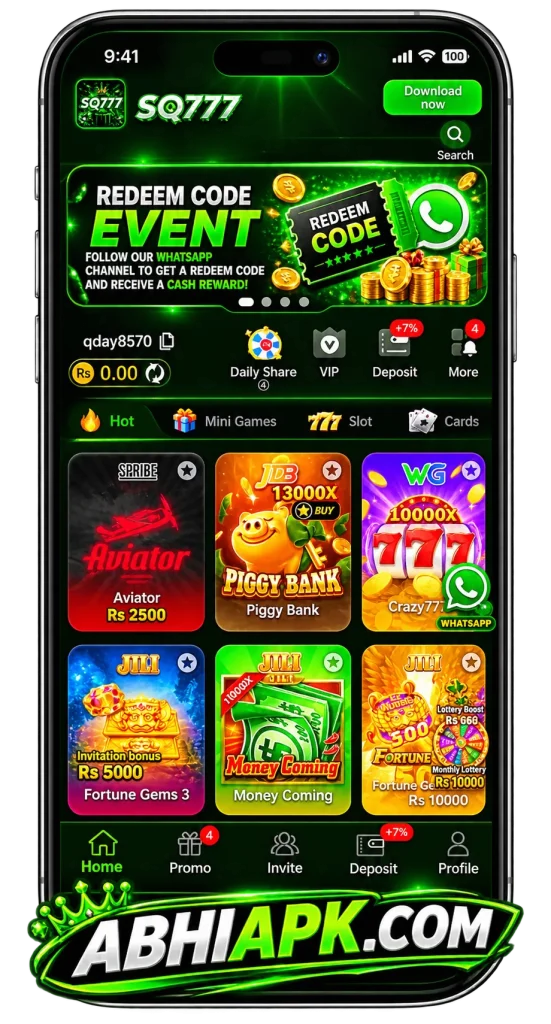
The platform combines game browsing, account management and promotional sections within one interface. The homepage provides search and category navigation, while the bottom menu links to Home, Promo, Support and Profile.
To check the SQ777 latest version, review the release information accompanying the download. Compare its version number with your existing installation and read any update instructions before replacing the app.
Promotional announcements and application updates serve different purposes. Use the Promo section for campaigns and the download listing for installation details. Must try the 666TA Game for a huge earning along with multiple bonuses.
Key Features of SQ777 Game
User-Friendly Navigation
The main menu separates game discovery, promotions, support and profile settings. This gives users clear starting points for common tasks.
Search helps locate a particular title, while category browsing is useful when comparing different game types.
Multiple Game Categories
The SQ777 app displays Mini Games, Slot, Fishing, Cards, Live, Sports and Lottery categories.
The catalogue also includes Hot, Recent and Favorites sections. Check the exact title and provider when multiple versions of a game appear.
Daily Rewards and Bonus Offers
The promotional interface includes download offers, referral rewards, redemption codes and special campaigns.
Open the relevant offer to review its eligibility, claim instructions and expiry date. The amount attached to one campaign may differ from another.
Registration and Account Access
New users can select Register, while existing users can access their accounts through Login.
The registration interface provides password and code registration options. Choose the method you intend to maintain and keep your recovery information accessible.
App Updates
Check the download listing for current release details and Android requirements.
Before updating or reinstalling, retain your login credentials and any information required to recover access.
Promotional Events
The Promo section displays campaigns such as Lucky Turntable, Lucky Day Bonus and daily redemption codes.
Review individual event pages for participation steps, reward types and campaign dates.
Referral and Sharing Tools
The invitation interface provides a referral link, QR code and sharing options, including Telegram, WhatsApp and Facebook.
These tools help users share the correct invitation details and direct new users to the relevant registration page.
Mobile Access and Compatibility
The compact layout places navigation, account controls and game listings within a mobile-style interface.
For Android installation, check supported software versions, storage requirements and requested permissions.

Games Listed on the SQ777 Platform
The catalogue contains titles from different providers and game categories. Use search or browse the current listings to find the intended version.
Featured Game Selections
Aviator
Aviator appears among the homepage listings with different branding. Check the provider and instructions of the particular entry you select.
Chicken Road 2.0
Chicken Road 2.0 is featured in the Hot section. Review its available settings and rules before starting a session.
Plinko
Plinko is listed in the catalogue. Open its instructions to understand participation options, costs and result information.
Fortune Gems 3
Fortune Gems 3 appears alongside other Fortune Gems entries. Confirm the version you intend to open, as similar names can refer to different titles.
Fortune Garuda 500
Fortune Garuda 500 provides another catalogue option. Review its game information and applicable rules within the selected listing.
More Titles to Explore
Super Ace
The platform lists both Super Ace and Super Ace Deluxe. Read their respective instructions when choosing between them.
Happy Fishing
Happy Fishing appears in the game selection. Check the controls and participation requirements before beginning.
Mahjong Ways
Mahjong Ways and Mahjong Ways2 are both listed. Use the instructions associated with the selected version.
Dragon Tiger (International)
Dragon Tiger (International) is available in the catalogue listings. Review the game’s rules and result conditions before participating.
Piggy Bank
Piggy Bank adds another option to the catalogue. Open its information panel to understand the available settings and participation requirements.
Additional listings include Crazy777, Wild Bounty Showdown, Money Coming, Treasures of Aztec and Fortune Rabbit. Check the current catalogue for the titles accessible to your account.
How to Download the SQ777 App for Android
To begin a SQ777 download, locate the Download now option on the intended platform page.
- Open the website and select Download now.
- Review the download destination and application information.
- Check the publisher, version and Android requirements.
- Download the installation file.
- Wait for the transfer to finish.
- Open the file and review the installation information.
- Check the requested permissions before proceeding.
- Open the app and select Register or Login.
If Android requests installation permission for your browser or file manager, keep that permission limited to the installation task. Review any device security message before continuing.
How to Register a SQ777 Account ?
The SQ777 registration form includes phone number/account entry, password registration and code registration.
To create an account:
- Select Register.
- Enter the requested phone number or account details.
- Choose the appropriate registration method.
- For password registration, create and confirm a unique password.
- Complete the verification required by the selected method.
- Read the User Agreement and eligibility conditions.
- Submit the form once the required details are complete.
The registration interface includes an over-18 declaration. Use accurate account information and keep verification codes private.
How to Log In to SQ777 ?
Select Login and enter the credentials associated with your account.
For SQ777 login assistance, check your account identifier, password and internet connection first. Use the available recovery process if you need to reset access.
Avoid sharing passwords or one-time codes with anyone offering account help.
SQ777 Deposit and Withdrawal Guide
The payment interface provides local deposit channels and separate withdrawal controls. Review the instructions for the selected transaction before confirming an amount or destination.
Deposit Methods for Pakistani Users
The Online deposit section displays the following channels:
| Channel label | Payment brand |
|---|---|
| JazzCash1 | JazzCash |
| Easypaisa_QR1 | Easypaisa |
| EasyPaisa | Easypaisa |
| JazzCash | JazzCash |
For a SQ777 JazzCash deposit or SQ777 Easypaisa deposit, select the relevant channel and follow its current instructions.
A Crypto tab is also displayed for users reviewing cryptocurrency deposit options.
How to Deposit Money
- Open Deposit.
- Select Online deposit.
- Choose an available payment channel.
- Enter an amount or choose a preset.
- Review any selected promotion and its conditions.
- Check the payment recipient and amount.
- Complete the transaction through the chosen provider.
- Keep the transaction reference and check your account record.
Use the recipient information supplied for the current transaction.
Deposit Amount Options
The deposit page displays these preset amounts:
| Preset amount | Preset amount |
|---|---|
| Rs100 | Rs500 |
| Rs1,000 | Rs5,000 |
| Rs10,000 | Rs30,000 |
| Rs40,000 | Rs50,000 |
Rs100 is the lowest preset button and Rs50,000 is the highest. Check the selected payment channel for its accepted amount range.
Deposit Bonus Offers
The deposit interface displays these promotional labels:
| Promotion | Displayed threshold |
|---|---|
| Rs20–15,000 Welcome Bonus | At least Rs100 |
| Daily Bonus Rs7–77,777 | At least Rs100 |
| Daily Extra Bonus Rs7–777,777 | At least Rs1,000 |
Read the selected campaign’s qualification, claiming and expiry requirements. The promotional range describes the offer; the amount awarded depends on its conditions.
How to Request a SQ777 Withdrawal ?
The withdrawal interface provides Normal withdrawal and Convert to crypto options.
For a normal withdrawal:
- Open Withdraw.
- Select Normal withdrawal.
- Open the destination selector.
- Select or add an eligible withdrawal account.
- Enter the requested amount.
- Review your withdrawable balance and applicable requirements.
- Check the destination details before submitting.
Use the payment destinations available in the withdrawal selector.
Convert to Crypto
Select Convert to crypto to review the conversion option.
Check the supported asset, network, conversion details and applicable charges before confirming. Where a destination address is required, review it carefully.
Withdrawal Conditions and Tracking
Before submitting a SQ777 withdrawal, check the current amount limits, processing information and account requirements displayed for the transaction.
Keep your request reference and use the account’s available transaction records to follow its status.
How to Start Exploring Games on SQ777
Browse the Categories
Use search or select a category to locate a game. Confirm the title and provider when similarly named entries appear.
Read the Game Rules
Review the objective, controls, costs and result conditions before participating.
Understanding the selected game’s instructions helps avoid mistakes when using its settings or account balance.
Open a Game or Practice Option
Select the intended listing and follow its instructions.
Check the Demo category for available practice options. Practice access varies between titles.
Learn the Interface Gradually
Explore the main controls before using unfamiliar features. Set a session budget and time limit, and keep essential expenses separate from gaming funds.
SQ777 Rewards, Referral Bonuses and Earning Options
The platform advertises rewards through invitations, app download campaigns, redemption codes, missions and promotional events.
Use the relevant section to review how each offer works, what activity qualifies and when a reward becomes available to claim.
Referral Program
The SQ777 referral bonus is advertised at Rs600 per friend.
Open the invitation section to access your referral link or QR code. Review the qualifying activity and reward conditions before sharing the offer.
A SQ777 referral code, where provided, should be entered according to the registration instructions associated with that campaign.
Daily Rewards and Redemption Codes
The Promo section includes daily redemption code offers.
Check the code’s validity, eligibility and claim instructions. Use the current campaign details when redeeming a code.
Special Events and Activities
Lucky Turntable and Lucky Day Bonus are among the displayed campaigns.
The Lucky Day banner highlights the 6th, 16th and 26th of each month. Open the relevant event to review participation requirements and available reward types.
Mission and Achievement Rewards
The Mission section provides access to activity-related promotions.
A platform announcement describes 1,500 Luck Points as qualifying for one draw. Review the mission details for the required tasks, point calculation and draw conditions.
Welcome and App Download Offers
App download and welcome offers change by campaign (for example Rs777 or Rs7,777). Always check the exact amount and conditions shown in your account before claiming.
Check the specific welcome or download offer attached to your account. Each promotional message should be read with its own qualification and claim conditions.
VIP Benefits and Rebates
The VIP and Rebate sections provide access to account-level promotional information.
Review tier requirements, qualifying activity, calculation periods and claim instructions for the benefit you intend to use.
Claiming and Withdrawing Rewards
Check your available withdrawable balance and complete the conditions attached to the selected offer.
These can include account verification, qualifying activity, expiry rules or play-through requirements. Review the reward details before submitting a withdrawal request.
Common SQ777 Issues and Solutions
APK Installation Problems
Check Android compatibility, available storage and whether the installation file downloaded completely.
Review device security messages and the permissions requested by the application.
Login Problems
Confirm your account identifier and password, then check the connection.
Use the available recovery option if needed. Contact support for an account restriction that requires assistance.
Slow Loading
Try a stable connection, close unnecessary background applications and restart the app where appropriate.
If clearing the cache, distinguish that action from clearing stored application data.
App Crashes
Record the device model, Android version, app version and action that caused the problem.
Check for a compatible update. Retain account recovery information before reinstalling.
A Deposit Is Not Showing
Compare the payment receipt with your transaction record. Check whether the payment provider marks the transfer successful, pending or failed.
Keep the reference number and investigate the original transaction before making another deposit.
A Withdrawal Is Taking Longer Than Expected
Check the request status, processing information and outstanding account requirements.
Contact support with the request reference and submission time if assistance is needed.
Pros and Cons of SQ777
Useful Features
- Multiple game categories and searchable listings.
- Separate Home, Promo, Support and Profile navigation.
- JazzCash and Easypaisa deposit channels.
- Referral links, QR codes and social sharing.
- Dedicated Mission, VIP, Rebate and Unclaimed sections.
Points to Consider
- Promotions have campaign-specific qualification conditions.
- Similar game names can refer to different versions.
- Payment requirements depend on the selected channel.
- App compatibility depends on the device and release.
- Bonus claiming and withdrawal may require additional account steps.
SQ777 Review and User Feedback
Editorial Review
The interface groups common tasks into identifiable sections. Users can search the catalogue, browse categories, access account controls and review campaigns without treating every function as part of the game lobby.
When comparing offers, focus on the actual qualification rules and value relevant to your account. For payments, review the selected channel and keep transaction references accessible.
Understanding Player Reviews
Detailed feedback is most useful when it identifies the feature, date and circumstances of the experience.
Gameplay Feedback
Look for comments naming the exact title, provider and device. These details make observations about controls or loading more useful.
Referral Reward Feedback
Useful referral feedback explains the qualifying activity, credited reward and claim process.
Payment Feedback
Transaction feedback should identify the method, request date and outcome without exposing private account information.
Conclusion: Is SQ777 Worth Exploring?
SQ777 brings game categories, promotional offers and account services into one platform. Users can explore titles such as Aviator, Chicken Road 2.0, Plinko and Super Ace, access referral tools and review event, mission, VIP and rebate sections.
For Pakistani users, JazzCash and Easypaisa deposit channels provide local payment options. The withdrawal interface offers Normal withdrawal and Convert to crypto controls, with transaction requirements available through the selected process.
Start by reviewing the app details, completing account registration and learning the platform’s navigation. Read each offer’s conditions, use accurate payment information and retain transaction records when managing your account.
18+ only. Online gaming involves real money and financial risk. Only use money you can afford to lose, set your own limits and check whether online gaming is permitted where you live. This website is an independent guide and is not the official SQ777 operator.
Frequently Asked Questions
What Is SQ777?
SQ777 is an online gaming platform with multiple game categories, promotional rewards and account services, including slots, fishing, cards and sports sections.
How Do I Download the SQ777 App?
Locate the Download now option on the intended platform page, review the publisher, version and Android requirements, then download and install the file.
How Do I Register a SQ777 Account?
Select Register, enter your phone number or account details, choose password or code registration, complete verification and accept the User Agreement.
What Is the Registration Age Requirement?
The registration interface includes an over-18 declaration. Online gaming is for adults only.
How Do I Log In to SQ777?
Select Login and enter your account credentials. Check your identifier, password and connection first, and use the recovery process if needed.
Can I Access My Account on Another Device?
Account access depends on the platform’s current rules. Keep your credentials and recovery information secure when using another device.
What Should I Do if a Game Has a Technical Error?
Record the game title, provider, device and action that caused the error, then check for an update or contact support.
Where Can I Find Practice Games or Instructions?
Check the Demo category for available practice options and open each game’s instructions panel. Practice access varies between titles.
How Can I Protect My Account Information?
Use a unique password, keep verification codes private and avoid sharing credentials with anyone offering account help.
Does SQ777 Accept JazzCash and Easypaisa Deposits?
Yes. The Online deposit section displays JazzCash and Easypaisa channels for users in Pakistan.
What Deposit Amounts Are Available?
Preset amounts range from Rs100 to Rs50,000. Check the selected payment channel for its accepted amount range.
How Do I Withdraw From SQ777?
Open Withdraw, select Normal withdrawal or Convert to crypto, choose or add a destination, enter the amount and review the details before submitting.
Where Can I Check Withdrawal Limits?
Check the current amount limits, processing information and account requirements displayed for the transaction before submitting a request.
What Is the SQ777 Referral Offer?
The referral bonus is advertised at Rs600 per friend. Review the qualifying activity and reward conditions in the invitation section before sharing.
How Can I Claim a SQ777 Bonus?
Open the relevant offer, review its eligibility, claim instructions and expiry date, complete any required conditions and claim it through your account.
How Do I Contact Customer Support?
Use the Support section in the app or the Telegram customer service channel for assistance with account, payment or technical issues.