
Caxto Panel Injector FF APK Download Latest Free For Android

Description
Free Fire players constantly seek ways to refine their gameplay. Some look for better sensitivity settings. Others want improved crosshair visibility. This demand has sparked interest in customization tools like Caxto Panel Injector. This guide explores what Caxto Panel Injector offers, how it works, and what players should know before trying it.
What Is Caxto Panel Injector?
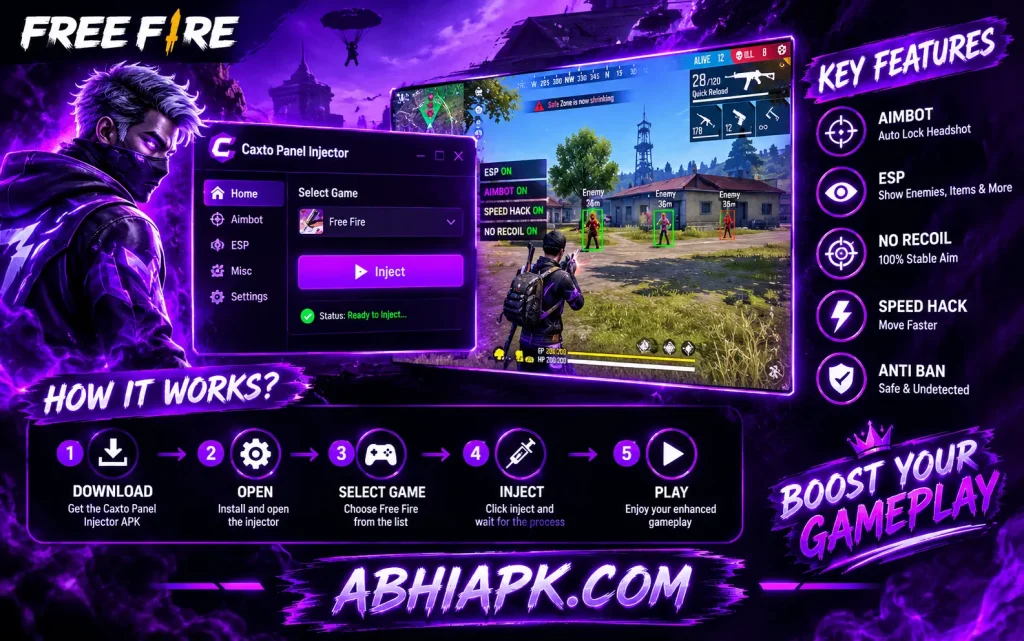
Caxto Panel Injector is an Android utility designed for Free Fire and Free Fire MAX players. It focuses on gameplay personalization rather than direct combat advantages. The app provides tools for adjusting aim settings, crosshair appearance, and device performance. It targets players who want more control over their gameplay feel. Caxto Panel operates as an independent application. It is not affiliated with Garena or Free Fire’s official development team. The Regedit Fire Sensi Max Injector also offers similar features along with more smooth graphics and Round-Trip time.
Key Features of Caxto Panel
- Crosshair Customization
Players can modify the crosshair style, size, and appearance for better target visibility. - Sensitivity Controls
The app offers granular sensitivity adjustments to match individual playstyles. - Aim Assistance Options
Settings designed to help players refine their aim response during matches. - Recoil Management
Tools for controlling weapon recoil patterns. - Performance Optimization
Options to improve device responsiveness and reduce lag. - Simple Interface
Clean layout that makes navigation straightforward for all users.
Why Players Look for Customization Tools?
Free Fire’s default settings don’t suit everyone. Some players need finer control over their aim. Others want crosshairs that match their visual preferences. Customization tools promise solutions. They offer adjustments that go beyond standard in-game options. This appeal drives interest in apps like Caxto Panel Injector. However, wanting better settings is natural. The question is whether external tools are the right path.
How to Use Caxto Panel Injector?
Step 1: Download the APK
Obtain the file from a reliable source. Verify the version matches your device.
Step 2: Enable Installation
Allow installation from unknown sources in your phone settings.
Step 3: Install the App
Open the downloaded file and complete the setup process.
Step 4: Grant Permissions
Review and approve any permission requests during installation.
Step 5: Configure Settings
Open Caxto Panel and adjust crosshair, sensitivity, and aim options.
Step 6: Apply Changes
Save your preferences and launch Free Fire to test the settings.
Note: Results may vary based on device and game version.
Ways to Inject Settings Using Caxto Panel
Different methods exist for applying customizations. Here are common approaches:
- Direct Overlay Method
The app runs alongside Free Fire. Settings apply in real-time during matches. - Configuration File Method
Users modify configuration files that the game reads on startup. - Profile-Based Method
Players create separate profiles for different game modes or weapons. - Manual Adjustment Method
Users tweak settings manually within the app before each session.
Each method has its own learning curve. Results depend on device compatibility and app version.
Device Compatibility and Requirements
Caxto Panel Injector works best on certain devices. Here’s what to consider:
- Android version: Generally requires Android 5.0 or higher
- RAM: At least 2GB recommended for smooth operation
- Storage: Lightweight app, usually under 30 MB
- Processor: Mid-range or higher for best performance
Older devices may experience limited functionality. Always check requirements before downloading.
Pros and Cons of Caxto Panel
| Pros | Cons |
|---|---|
| Offers crosshair customization options | Version inconsistencies across sources |
| Provides sensitivity tuning tools | May not work on all Android devices |
| Lightweight file size | Features vary between releases |
| Simple interface design | Compatibility issues possible |
| Free to download | Game rules may restrict external tools |
| Performance optimization features | Account safety risks exist |
Important Safety Considerations
Free Fire maintains strict policies against third-party tools. The game’s Abuse Policy states that using unauthorized programs can result in permanent account suspension. Garena’s anti-cheat system detects modified game clients and unauthorized tools. Even visual-only modifications may violate terms of service. Players should understand these risks before using any external customization application. The safest approach is using in-game settings provided by Free Fire itself.
Legal and Policy Aspects
Free Fire’s terms of service prohibit tools that modify the game. This includes apps that change visual elements or gameplay mechanics. Garena regularly updates its detection systems. What works today may trigger a ban tomorrow. Understanding these policies helps players make informed choices. Reading the official rules takes only a few minutes.
Common Myths About Injector Tools
Several misconceptions surround game customization apps. Let’s address them:
Myth: Visual changes are always safe.
Reality: Any unauthorized modification can violate game policy.
Myth: Free tools have no risks.
Reality: Free apps may contain malware or steal data.
Myth: Detection systems can’t identify overlays.
Reality: Anti-cheat technology improves constantly.
Myth: Everyone uses these tools without issues.
Reality: Many players face bans without publicizing it.
Alternatives to External Tools
Safer options exist for Free Fire players. Consider these alternatives:
- In-Game Settings
Free Fire offers extensive sensitivity and control options. Mastering these can improve performance significantly. - Training Mode Practice
Regular practice in training mode builds muscle memory. This natural approach carries no risks. - Community Guides
Many experienced players share free tips and configurations. These resources help without violating policies. - Official Customization Items
Free Fire provides skins, crosshairs, and other cosmetic options. These are safe and supported.
Frequently Asked Questions
What is Caxto Panel Injector?
An Android app offering gameplay customization tools for Free Fire players.
Is Caxto Panel Injector free?
Yes, the application is free to download.
Does it work on all phones?
No. Compatibility depends on Android version and device specifications.
Can Caxto Panel Injector cause a ban?
Using unauthorized tools violates Free Fire’s policies. Account suspension is possible.
What features does it include?
Crosshair customization, sensitivity controls, aim assistance settings, and performance options.
How do I update Caxto Panel Injector?
Download the latest version from the same source. Avoid unknown websites.
Can I use Caxto Panel Injector on Free Fire MAX?
Some versions support both. Check compatibility before installing.
Tips Before Downloading Any Injector
Consider these points before getting any customization tool:
- Research the source thoroughly
- Read user reviews on multiple platforms
- Scan files with security software
- Check your game’s current policy
- Understand the ban risk
- Never share account credentials
- Keep backups of important data
Taking these steps protects both your device and your gaming account.
Final Thoughts:
Caxto Panel appeals to Free Fire players seeking more control over their gameplay settings. Its advertised features include crosshair adjustments, sensitivity tuning, and performance tools. However, players must weigh these benefits against potential risks. Free Fire’s strict anti-cheat policies mean any unauthorized tool carries account safety concerns. Before trying Caxto Panel, review the game’s rules carefully. Understanding the risks helps you make an informed decision about external customization tools.The safest path remains using official in-game options. They may require more practice, but they protect your account and device.