Sniper Gaming VIP Injector FF APK Latest Free Download

Description
Free Fire players continuously explore tools that sharpen their gameplay. Precision aiming and visual clarity rank high among their priorities. Sniper Gaming VIP Injector has appeared as one such option.This article breaks down what the tool offers, how it operates, and what players should weigh before trying it.
What Is Sniper Gaming VIP Injector?
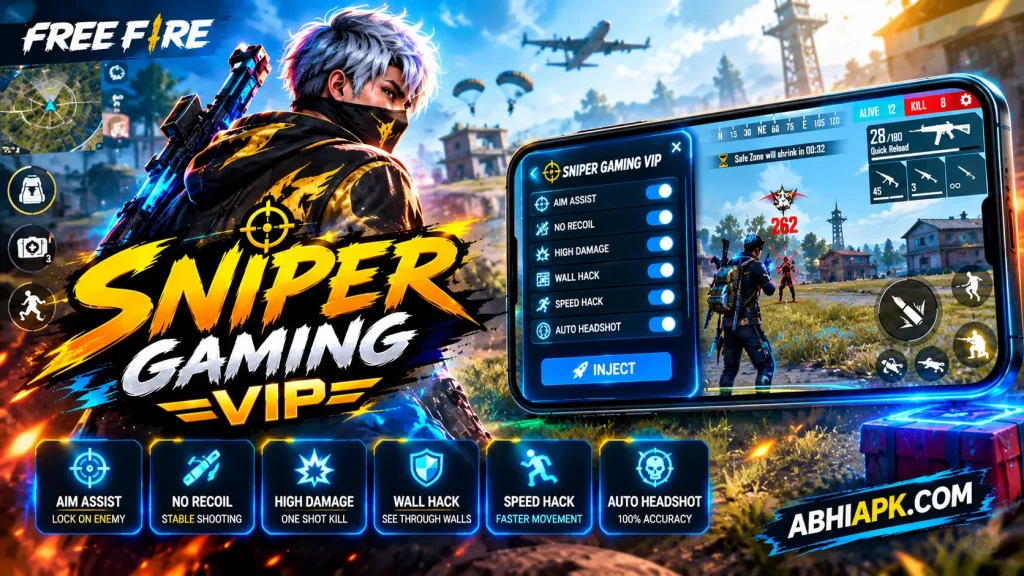
Sniper Gaming VIP Injector is an Android utility built for Free Fire enthusiasts. It targets players who want refined aim control and visual adjustments.The app focuses on precision tools rather than resource generation. It provides crosshair tweaks, sensitivity presets, and targeting aids. Developers market it as a lightweight companion. It runs independently and is not connected to Garena’s official services. If you want to promote your gameplay to a next level then try Rich Injector now.
Core Features of Sniper Gaming VIP Injector
Headshot Assistance
Settings designed to improve headshot accuracy during matches.
Crosshair Customization
Multiple crosshair styles, colors, and sizes to choose from.
Sensitivity Presets
Ready-made sensitivity profiles for different playstyles.
Aim Lock Options
Tools aimed at stabilizing aim during rapid movements.
Recoil Control
Adjustments to manage weapon kick patterns.
Performance Boosters
Options to reduce lag and improve frame stability.
Clean Interface
Simple layout that requires minimal learning.
Why Players Seek Aim Enhancement Tools?
Standard Free Fire settings don’t fit every player. Some need finer aim control. Others prefer crosshairs tailored to their vision. Enhancement tools promise these adjustments. They offer precision that default options may lack. This gap drives interest in apps like Sniper Gaming VIP Injector. The desire for improvement is natural. The real question is whether external tools deliver safely.
How to Use Sniper Gaming VIP Injector APK?
Step 1: Download the APK
Get the file from a trusted platform. Confirm version compatibility.
Step 2: Enable Unknown Sources
Adjust phone settings to allow external installations.
Step 3: Install the Application
Open the file and complete the setup process.
Step 4: Review Permissions
Check requested access before approving anything.
Step 5: Configure Your Settings
Adjust crosshair, sensitivity, and aim preferences inside the app.
Step 6: Launch Free Fire
Open the game and test your configured settings.
Results depend on device performance and app version.
Ways to Inject Settings Using Sniper Gaming VIP Injector
Several methods exist for applying configurations. Here are the common ones:
Overlay Method
The tool runs on top of Free Fire, applying changes live during matches.
Pre-Launch Setup
Users configure everything before opening the game.
Profile Switching
Different profiles store separate settings for various modes.
Direct File Adjustment
Some versions modify configuration files the game reads.
Real-Time Tweaking
Certain releases allow mid-match adjustments.
Each method has unique compatibility requirements. Device specifications determine which works best.
Device Compatibility and Requirements
Sniper Gaming VIP Injector performs best on specific hardware. Keep these factors in mind:
- Android version: Usually requires Android 5.0 or later
- RAM: Minimum 3GB recommended for smooth operation
- Storage: Lightweight, generally under 40 MB
- Processor: Mid-range or higher for reliable performance
- Display: Higher refresh rates enhance crosshair visibility
Older devices may face functional limits. Always verify compatibility beforehand.
Pros and Cons of Sniper Gaming VIP Injector
| Pros | Cons |
|---|---|
| Offers multiple crosshair styles | Version reliability differs across sources |
| Provides sensitivity presets | May not support every Android device |
| Compact file size | Features vary between releases |
| Straightforward interface | Game policies restrict external tools |
| Free to download | Account safety risks remain |
| Performance tuning options | Results depend heavily on hardware |
Safety and Policy Considerations
- Free Fire enforces strict rules against third-party utilities. Garena’s terms prohibit unauthorized modifications of any kind.
- Anti-cheat systems monitor gameplay patterns continuously. Detection technology improves with every update.
- Even visual-only tools can trigger flags. Account suspension remains a real possibility.
- Players should understand these risks fully. The safest route involves using only official in-game settings.
Legal Aspects to Understand
Free Fire’s service terms clearly define prohibited conduct. External tools that alter game behavior fall under restricted categories.Garena conducts regular enforcement actions. Bans often arrive without prior notice. Reading official policies takes minutes. It protects long-term account access and peace of mind.
Common Myths About Injector Tools
Misconceptions surround gaming enhancement apps. Let’s clear them up:
Myth: Aim tools are undetectable.
Reality: Anti-cheat systems analyze behavior patterns, not just files.
Myth: Free tools carry no hidden costs.
Reality: Free apps may compromise data or device security.
Myth: Visual changes are always permitted.
Reality: Any unauthorized modification can violate game policy.
Myth: Popular tools guarantee safety.
Reality: Popularity says nothing about security or legitimacy.
Myth: Frequent updates ensure protection.
Reality: Detection systems evolve faster than most tools.
Tips Before Installing Any Injector
Consider these precautions before downloading:
- Research the source across multiple platforms
- Read recent user feedback carefully
- Scan files with reliable security software
- Check your game’s current policy
- Understand ban risks completely
- Never share login credentials
- Keep account recovery information updated
These steps shield both your device and your gaming profile.
Alternatives to External Tools
Safer options exist for improving Free Fire performance. Explore these paths:
Official Training Grounds
Practice aim and movement without any risk.
In-Game Sensitivity Guides
Community-created settings shared freely online.
Custom HUD Layouts
Free Fire’s built-in customization covers many needs.
YouTube Tutorials
Experienced players share techniques and configurations.
Regular Practice Routines
Consistent play builds natural skill over time.
Frequently Asked Questions
What is Sniper Gaming VIP Injector?
An Android app offering aim and visual customization tools for Free Fire.
Is it free to download?
Yes, the application is advertised as free.
Does it work on all phones?
No. Compatibility depends on device specs and Android version.
Can it cause account issues?
Using unauthorized tools violates Free Fire’s policies. Suspension is possible.
What features does it include?
Crosshair options, sensitivity presets, aim assistance, and performance tools.
How often is it updated?
Update frequency varies by source. Check regularly for new versions.
Is it safe?
Safety depends on file origin. All third-party tools carry inherent risks.
Final Thoughts:
Sniper Gaming VIP Injector appeals to Free Fire players seeking sharper aim and clearer visuals. Its advertised features include crosshair customization, sensitivity presets, and performance tuning.Yet these benefits come with real concerns. Free Fire’s strict enforcement means any external tool threatens account standing. Before trying Sniper Gaming VIP Injector, study the game’s rules carefully. Understanding the risks leads to smarter choices. The safest approach remains mastering official in-game options. They demand patience but protect everything you’ve built.