VM Injector APK Download Latest Free Download For Android

Description
Android gaming has grown beyond just playing matches. Many players now want their characters and weapons to look unique. This demand has led to the rise of skin customization tools. VM Injector is one such application gaining attention among mobile gamers.
This guide covers everything you need to know about VM Injector, from its features to safety considerations.
What Is VM Injector?
VM Injector is an Android tool designed for players who want to change how their games look. It focuses on visual elements like character skins and weapon appearances. The app does not aim to improve gameplay skills or match performance.
Its main purpose is appearance modification. Users can browse a collection of skin designs and apply them to supported games. The tool is built for simplicity, making it accessible even to those who are not tech-savvy.
The application is lightweight, around 20 MB. This makes it suitable for phones with limited storage space. Also try the Xenos injector for more better experience and professional gameplay.
Key Features of VM Injector
1. Skin Variety
The app offers multiple skin designs for compatible games. Players can pick styles that match their taste.
2. Small File Size
At roughly 20 MB, it won’t eat up much of your phone’s memory.
3. Easy Navigation
The layout is clean and straightforward. Finding skins doesn’t require digging through complex menus.
4. Update Alerts
Some versions notify users when new skins are added. This saves time checking manually.
5. Feedback System
Users may be able to request specific designs or report issues directly through the app.
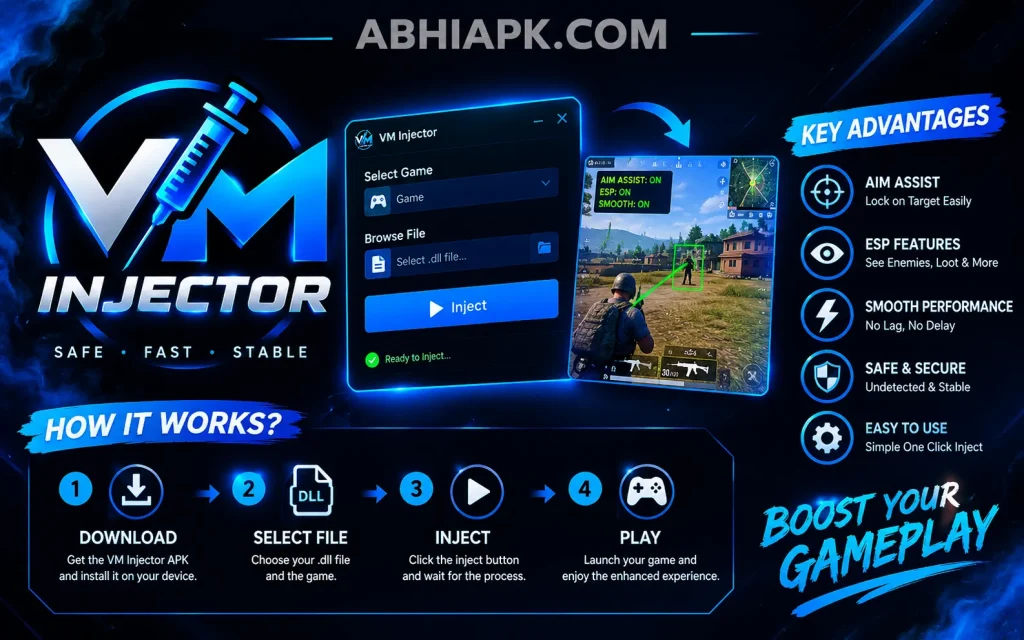
Ways to Inject Skins Using VM Injector
Injecting skins typically involves a few basic steps. Here’s how it generally works:
Step 1: Download the APK
Get the file from a trusted source. Avoid unknown websites.
Step 2: Enable Unknown Sources
Go to your phone settings and allow installation from unknown sources.
Step 3: Install the App
Open the downloaded file and complete the installation process.
Step 4: Grant Permissions
The app may request storage or overlay permissions. Review these carefully.
Step 5: Select Your Game
Choose the supported game you want to modify.
Step 6: Pick a Skin
Browse the collection and select your preferred design.
Step 7: Apply and Launch
Activate the skin and open your game to see the changes.
Note: Results may vary depending on your device and app version.
Pros and Cons of VM Injector
| Pros | Cons |
|---|---|
| Offers various skin options | Skin availability differs by version |
| Compact size (around 20 MB) | Not compatible with all Android devices |
| Simple, user-friendly interface | Some features may not work as promised |
| May provide update notifications | Alerts vary between releases |
| Allows visual style exploration | Game rules may prohibit external tools |
| May include request features | Support is not always guaranteed |
Things to Check Before Installing
Before you install VM Injector, consider these points:
- Verify the file source is legitimate
- Check what permissions the app requests
- Confirm your Android version is supported
- Run a security scan on the downloaded file
- Back up your game data and account details
- Read your game’s policy on third-party tools
Skipping these steps could put your device or account at risk.
Can VM Injector Affect Your Gaming Account?
This depends on how the tool works and your game’s rules. Some games strictly forbid external modification tools. Even visual-only changes can violate terms of service.
Never assume a skin tool is allowed. Check the official game policy first. If unsure, stick to in-game customization options.
Also, never share your password or verification codes with any third-party app.
User Reviews
Shayan
“The layout is simple. I hope future updates add more designs.”
Nadeem Khan
“Lightweight app, good for phones with less storage. Check compatibility first.”
Hasan Raheem
“I like exploring new skin styles. But I always test if they work properly.”
Anita
“The collection sounds interesting. Clear update info would help.”
Frequently Asked Questions
What is VM Injector APK?
It’s an Android app for custom skin designs and visual changes in supported games.
How much space does it need?
Approximately 20 MB, though actual size may vary by version.
Does it work on all Android phones?
No. Compatibility depends on your device and Android version.
Is VM Injector safe?
Safety depends on the file source. Always scan the file and review game rules.
Final Thoughts:
VM Injector appeals to Android gamers who want fresh visuals without large downloads. Its advertised features include skin collections, simple navigation, and update alerts.
However, actual results depend on the version, your phone, and the game. Always check compatibility and security before installing. Understanding your game’s rules is equally important.
A cautious approach lets you enjoy visual customization while protecting your device and account.